Embroidery stitch count and run time: how to know them before you quote
How to find an embroidery design's stitch count and run time before you quote: with the file, without it, and at your machine's real speed.
Satinwise Team7 min read
Before you give a price or a due date you need two numbers: how many stitches the design has and how many minutes each piece takes on the machine. Guess them and you undercharge on heavy designs or promise a date you won't make.
Here's where each number comes from, how to work out the minutes at your machine's real speed, and what to do when you don't have the file yet.
Why stitches and minutes come first
Wilcom, the maker of EmbroideryStudio, puts it this way: embroidery machines have a maximum stitch speed, so stitches are a cost that grows with the design. It adds that the number of colors has a "dramatic" effect on run time, because every thread change takes time and is one more chance of a thread break (Wilcom, "Embroidery pricing", Spanish help page).
The same page adds a useful nuance: on small orders, stitch-count accuracy matters less, because setup and handling weigh more. On large orders, a stitch-count error is multiplied by every piece.
If you have the file: the real number is inside
An embroidery file (PES, DST, JEF and the rest) is the list of instructions the machine follows: every stitch, jump, trim and thread change. That's why the stitch count isn't a guess: it's read from the file.
There are two ways to read it in Satinwise:
- Free check, no account. On the home page, drop your file and see stitches, colors, size and estimated minutes. This check estimates time for a single-needle machine at 600 stitches per minute and doesn't keep your file.
- Analyze, with your machine. With an account you pick your machine (or create your own with its needles and speed) and the time is worked out for it. Free includes 1 full analysis a month; Pro has no monthly limit.
How minutes per piece are worked out
A piece's machine time isn't just stitches over speed. Satinwise estimates it by adding four parts:
| Part | How it's worked out |
|---|---|
| Stitches | stitches ÷ your machine's stitches per minute |
| Thread changes by hand | 1 minute per change (single-needle, or when there are more colors than needles) |
| Automatic changes | 0.1 minutes per change (a multi-needle switches needles on its own) |
| Long jumps you trim | 0.1 minutes per jump longer than 12 mm, if your machine doesn't trim them |
These are estimates, not a stopwatch: the way you work may be faster or slower. What matters is that the number comes from the file and your machine, not from memory.
Example with a real design
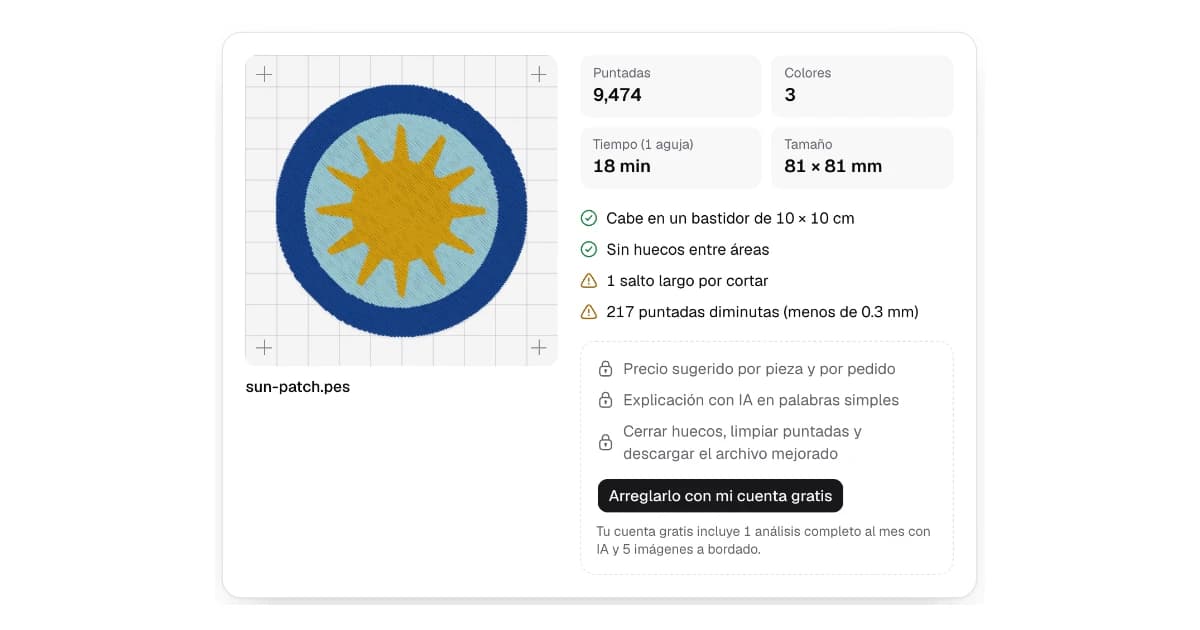
Satinwise's home page has example designs. One of them, sun-patch.pes, has 9,474 stitches, 3 colors and 1 long jump, and the free check gives it 18 minutes. Here's where that number comes from, and what changes on a multi-needle:
| Single needle, 600 spm, doesn't trim | 10 needles, 800 spm, trims on its own | |
|---|---|---|
| Stitches | 9,474 ÷ 600 = 15.8 min | 9,474 ÷ 800 = 11.8 min |
| 2 thread changes | 2 × 1 = 2 min | 2 × 0.1 = 0.2 min |
| 1 long jump | 0.1 min | 0 (the machine trims it) |
| Total per piece | 17.9 ≈ 18 min | 12.0 min |
spm = stitches per minute. Worked out with Satinwise's formula; the speeds are the typical ones the app uses if you don't enter yours.
In 6 hours of machine time (360 minutes), that's about 20 pieces on the single needle and 29 on the multi-needle, before counting hooping time. Same file, and the machine changes the schedule by almost 50%.
Your machine's real speed
The brochure speed is the maximum, not the everyday one. Wilcom notes that the top speed a job can run at depends on the fabric, and that the location (a cap, for example) can lower it too (Wilcom).
Manufacturers show it in their own specs. SWF lists its KX series at up to 1,200 stitches per minute on flat goods and up to 1,000 on caps (SWF USA). At top speed, the same design takes 20% longer on a cap than on a T-shirt.
That's why Satinwise uses typical speeds below the maximums (600 spm for single-needle, 800 for multi-needle and 1,000 for some industrial models), and lets you enter your own in Settings. To find yours:
- Stitch a design whose stitch count you know.
- Time only the minutes the machine is actually stitching (not thread changes or stops).
- Divide the stitches by those minutes. That's your real stitches per minute.
If you run caps or delicate fabrics slower, test those too.
What the file doesn't count
The file says how long the machine takes, not how long you take. Left out of the file:
- Hooping each piece and taking it out.
- Trimming threads and stabilizer, and folding.
- Setting up the machine for the job: loading threads, centering, running a test.
Wilcom treats setup as a fixed cost per job, however many pieces it has (Wilcom). When you plan dates, add a few minutes per piece for hooping and trimming. In Satinwise orders (Pro), your shop's capacity already adds a prep time per piece that you set.
If you don't have the file yet
It happens all the time: the customer sends a JPG logo and wants a price today. Options, from most to least accurate:
- Ask the digitizer. If someone is going to digitize the logo, ask for a rough stitch count before you quote.
- Make a quick probe design at final size. Embird describes this method: commercial digitizers often need an approximate stitch count before starting, because digitizing is frequently priced on the final stitch count. You trace a rough "probe" design, no fine detail, at the final size, generate the stitches, and use that total as the estimate (Embird, "Stitch Count Estimation"). If the size isn't final, the number is useless.
- Compare with designs you've already measured. If you've stitched logos of similar size and fill, their real stitch counts are your best reference.
- For simple logos, try Image to embroidery. With a flat logo of few colors, Image to embroidery (Beta) creates a file and gives you its stitches and minutes. Treat it as a guide: it doesn't work for photos or complex drawings, and the digitizer's final file may have a different count.
In all four cases, quote a range and say the final price is confirmed with the file. That way you don't lose money if the design comes out heavier.
How to cut minutes without cutting quality
Once you know where the minutes go, you can trim them:
- Fewer thread changes. On a single-needle machine, every change is a minute. If the file changes color more often than it needs to, reordering colors without changing what sits on top saves time (Optimize, on Pro).
- Fewer threads to trim. If your machine doesn't trim on its own, every long jump is a thread you cut. Improve file can add trims at long jumps.
- Lower density, carefully. Wilcom explains that you can reduce the stitch count to make production cheaper by adjusting density (Wilcom Docs). That changes how the embroidery looks and covers: do it in your digitizing software and stitch a test before using it on an order.
From minutes to price
With real stitches and minutes, your price stops being a guess. In how much to charge for embroidery we show how to turn those minutes into machine cost and add your margin, and the embroidery price calculator lets you try it with your numbers, free and with no sign-up. Before you stitch the order, run the file through the 8-point checklist.
Frequently asked questions
How do I find an embroidery file's stitch count?
The number is inside the file. Drop it into the free check on Satinwise's home page and, with no account, you see stitches, colors, size and estimated minutes. We don't keep your file.
How long does a design take to stitch?
It comes down to three things: stitches divided by your machine's real speed, the time for thread changes, and the threads you trim by hand. Then add hooping and trimming each piece.
How many stitches per minute does my machine really sew?
Fewer than the brochure's top speed. Fabric and garment slow it down: on caps, for example, SWF lists up to 1,000 stitches per minute against 1,200 on flat goods. Measure your real speed with a timed stitch-out.
How do I estimate stitches if I only have the logo as an image?
With a quick probe design at final size in your digitizing software, by asking the digitizer, or by comparing with similar designs you've already measured. Quote a range and confirm the price once you have the file.
Published October 19, 2026