Check your embroidery file before you stitch: an 8-point checklist
An 8-point checklist for PES, DST or JEF files before you stitch: format, hoop, stitch count, jumps, gaps and density. Free file check, no account.
Satinwise Team5 min read
A bad file gives no warning: you find out when the machine has broken thread three times, when the design doesn't fit the hoop, or when the customer's garment comes out with gaps. Checking the file first takes a couple of minutes and saves the garment, the thread and the machine time.
Here's the 8-point checklist worth running on any PES, DST, JEF or whatever format you're sent. You can do the first seven in seconds with Satinwise's free file check, no account needed.
The quick checklist
| # | What to check | Why it matters |
|---|---|---|
| 1 | The format your machine reads | If it's not its format, the machine won't open it |
| 2 | Size against your hoop | If it doesn't fit, it can't be stitched |
| 3 | Stitches and time | The basis of your price and your schedule |
| 4 | Colors and thread order | Every change costs time |
| 5 | Long jumps | Thread you'll have to trim |
| 6 | Tiny stitches | Stitches that add nothing to the design |
| 7 | Gaps between areas | Fabric will show |
| 8 | Density, stabilizer and a test | The fabric has a say too |
1. The format your machine reads
Each brand has its format. These are the usual pairings, according to the University of Geneva's EduTech Wiki:
| Format | Brand |
|---|---|
| PES | Brother, Babylock |
| JEF | Janome |
| DST | Tajima (widely used on industrial machines) |
| EXP | Melco, Bernina (high-end models) |
| VP3 | Pfaff (newer) |
| XXX | Singer, Compucon |
The Ink/Stitch documentation sums it up: many machines support DST, while some Brother models work better with PES (Ink/Stitch, workflow). Always confirm in your machine's manual.
If you have to convert the file, check it again afterwards: pyembroidery, the open-source library that reads and writes these formats, warns that embroidery reading and writing "is always lossy" (pyembroidery).
2. Size against your hoop
A 110 mm design won't fit a 100 × 100 mm hoop, however close it is. Check the design's width and height against your hoop's sewing field (not its outside size). If it's a tight fit, center the fabric carefully.
The free check compares against a 10 × 10 cm hoop. If yours is different, pick your machine and hoop in Analyze in your Satinwise account.
3. Stitches and machine time
Stitches set how long the machine runs and, with that, what you should charge. With the file's real count, your quote stops being a guess. If you're not sure how to turn stitches into a price, read how much to charge for embroidery or use the embroidery price calculator.
4. Colors and thread order
Count the colors and look at the order: on a single-needle machine, every change is a stop to rethread by hand. Some formats only store where the thread changes, not which color it is; in that case Satinwise shows suggested colors and reminds you to note the thread order before loading them.
5. Long jumps
A jump is when the needle moves from one spot to another without stitching. If it's long and has no trim, it leaves a thread you have to cut by hand. Ink/Stitch recommends planning the stitch order to reduce visible jumps and avoid stitching over them, because trimming them later takes time (workflow).
Satinwise's check counts jumps longer than 12 mm.
6. Tiny stitches
These are stitches so short you can barely see them. Digitizing programs have a minimum-length setting to remove them: in Ink/Stitch, stitches shorter than the minimum stitch length are removed (Ink/Stitch, tatami fill).
Satinwise's check counts stitches under 0.3 mm. A few are normal (lock stitches, for example); a lot of them point to a file worth cleaning up.
7. Gaps between areas
If two areas that should touch are left with a narrow opening, the fabric will show when you stitch. The cause is almost always fabric pull; we explain it in gaps between fill and outline.
The free check tells you how many gaps there are and marks them on the preview.
8. Density, stabilizer and a test stitch-out
The file is only half the story. The other half is the fabric:
- Stabilizer for the stitch count. Manufacturers say what each one supports: Floriani says its Heat N Sta Tearaway supports "about an 8,000-stitch count" on a well-digitized design and its Perfect Stick Cutaway "generally" a 12,000-stitch count (Floriani guide, PDF).
- Density. Wilcom explains that you may need to change stitch density to sew on a different fabric or with a different thread, or to lower the stitch count and make production cheaper (Wilcom Docs).
- Test stitch-out. Ink/Stitch recommends sewing a test on fabric that matches the final material, with the same stabilizer, and watching for gaps and areas where stitches are packed so tightly the machine struggles: signs of density set too high (workflow, step 6).
Check your file in seconds, free
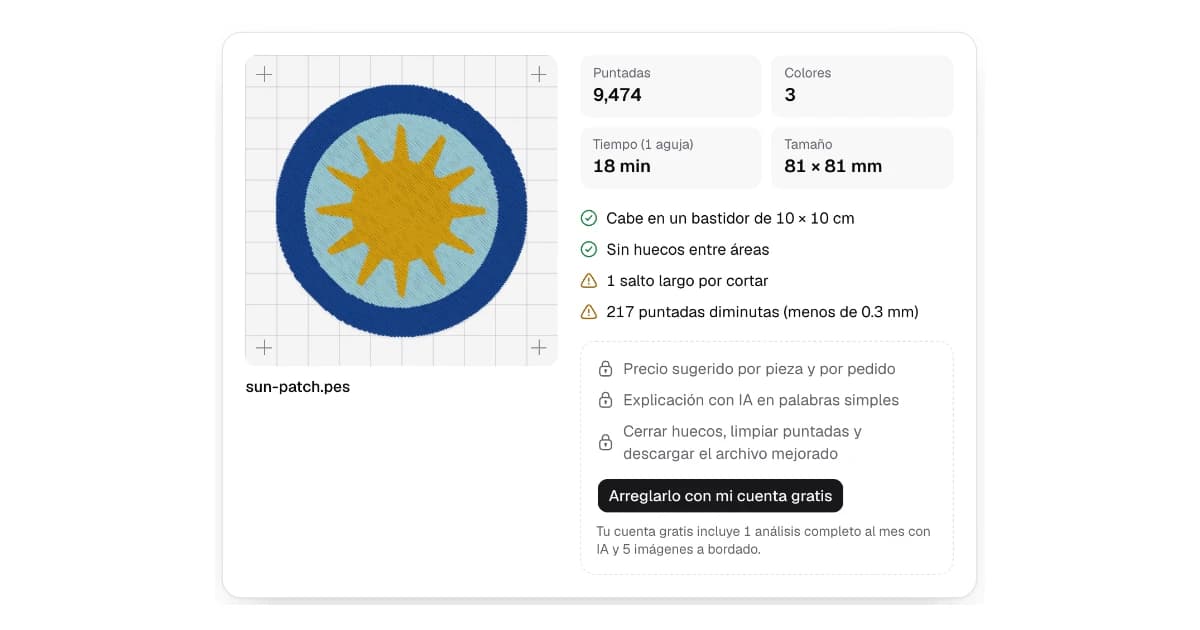
On Satinwise's home page, drop your file (PES, DST, JEF, EXP, VP3, XXX and more, up to 10 MB). With no account you see:
- stitches, colors, size and estimated time (for a single-needle machine),
- whether it fits a 10 × 10 cm hoop,
- how many gaps there are where fabric would show, marked on the preview,
- how many long jumps need trimming,
- how many tiny stitches (under 0.3 mm) it has.
We don't keep your file: it's checked and discarded. No file at hand? There are example designs on the home page.
Frequently asked questions
How can I see a PES or DST file's stitch count without software?
Drop it into the free file check on Satinwise's home page. With no account it shows stitches, colors, size and estimated minutes, and it doesn't keep your file.
Which format does my embroidery machine need?
It depends on the brand: PES is Brother and Babylock, JEF is Janome, DST is Tajima and many industrial machines, EXP is Melco and Bernina, VP3 is Pfaff and XXX is Singer. Confirm it in your machine's manual.
Why sew a test if the file looks fine?
Because fabric and stabilizer change the result. A test on the same fabric with the same stabilizer shows distortion gaps and overly dense areas before you ruin a garment.
Does the free check use my machine and hoop?
No. The no-account check compares against a 10 × 10 cm hoop and estimates time for a single-needle machine. With an account, Analyze uses your machine and hoop.
Published October 19, 2026